What a prevalue source does
A prevalue source supplies choices to a field: a stored Value and a visible Label. It does not, by itself, store an entire submission in that source. Use a database insert binding when submitted records must reach a SQL table.
Create a reusable source in MegaForm's data/prevalue configuration, then select it in the choice field's options settings. Depending on the provider, sources can read a static/text list, SQL, Umbraco documents or supported Umbraco data type options.
Watch the SQL choice-source walkthrough
The recording uses the site's dedicated workshop lookup table. It previews the choices and connects the source to a dropdown; no production table or existing form is changed.
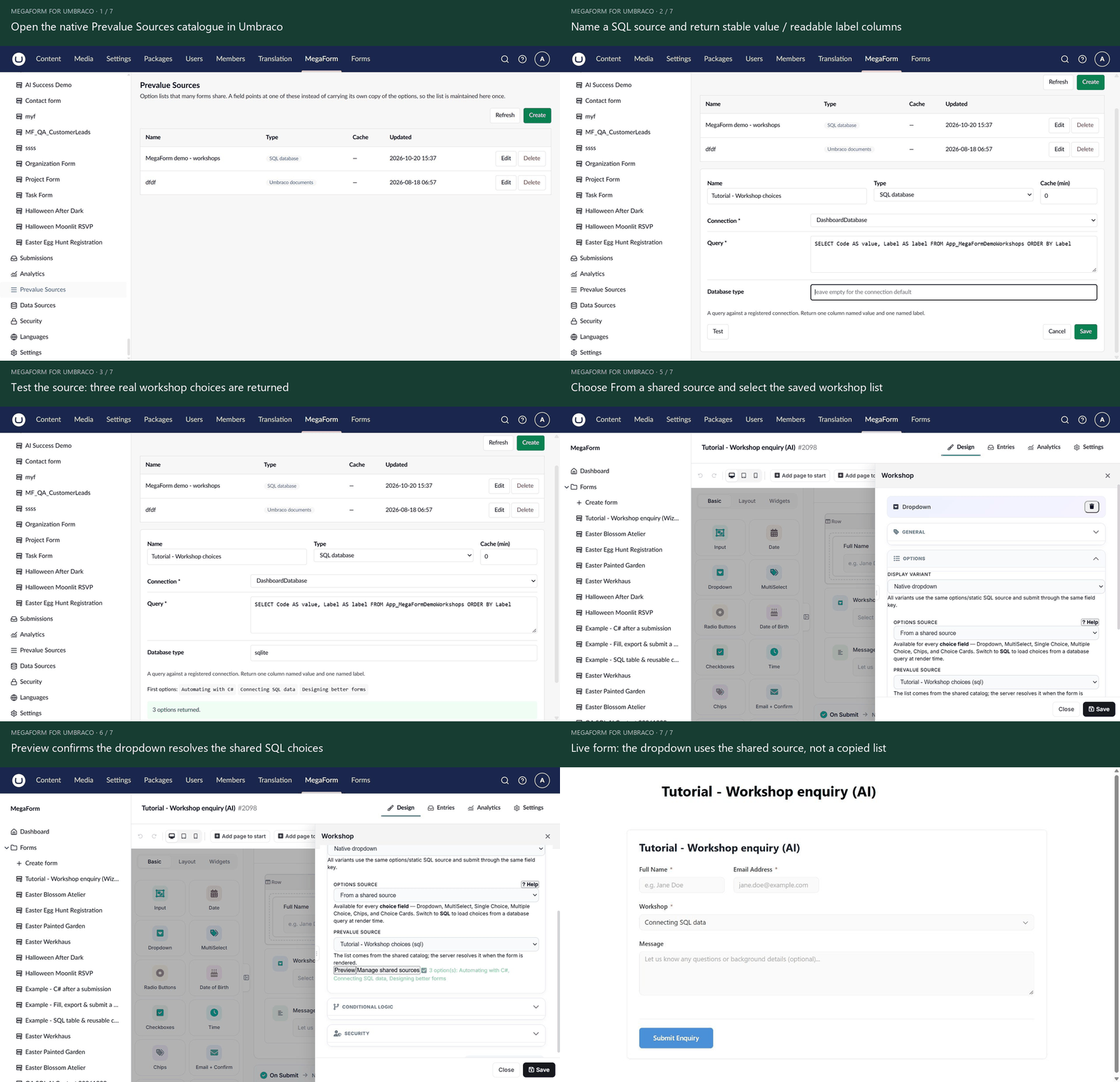
Open the animation at full size.
Create and assign a reusable SQL source
- Open Prevalue Sources in the native MegaForm navigation and select Create.
- Give the source a distinct name and choose SQL database. Other native providers include Text file, Umbraco data type and Umbraco documents.
- Select an allowed named connection. Enter a read-only SELECT query that returns one column named
valueand another namedlabel. - Set the database type when required by the connection and choose the intended cache duration. Select Test to inspect the returned options.
- Select Save.
- Select the target Dropdown/Radio/Checkbox field in the builder. Choose From a shared source in its options source, then select the saved source.
- Preview the options and the actual public form. Change a lookup label and reload to verify the intended caching behaviour.
The example uses stable workshop codes as values and readable workshop names as labels. Reusing one source across fields avoids maintaining a separate copy of the same list on every form.
The builder's Manage shared sources dialog is another entry point. Its SQL assistant can select an allowed table and columns, generate the SELECT, and Preview options before saving. It uses the same source catalogue.
Umbraco document choices
Choose a root content node, optionally include descendants and filter by Document Type alias. Select the property used for the stored value and the property used for the label. Without a configured value property, the provider can use the node's stable key; the label can fall back to the published node name.
A source can use the current page or a supported dynamic root. In that case render the form with the containing page's content-id. Check published content and the active culture when a list is empty.
SQL and dependent choices
Return a stable Value/Label pair. A child list can depend on a parent field using a parameter such as :customer_id; configure the dependency and reload-on-change option. Never concatenate submitted text into SQL.
When the parent changes, verify that an obsolete child selection is cleared or rejected. Check empty input and a parent with no children.
The SQL working example uses one source for workshop choices and a separate insert binding for bookings. This demonstrates the distinction between reading options and writing a row.